

A prescription upload is the step where a prescriber’s instruction reaches an online pharmacy so a pharmacist can check it before any prescription-only medicine is supplied. For licensed practitioners ordering aesthetic and wellness products, the process comes down to three things: a prescriber whose registration can be verified, a prescription that meets the legal content rules, and a secure way to send both. This guide is written for qualified aesthetic professionals, prescribers and clinic managers. It walks through the process in order, explains what the pharmacy checks and why, and shows how it differs from the NHS Electronic Prescription Service.
TL;DR
- A prescription-only medicine can only be supplied against a valid prescription from an appropriate practitioner, so the upload is the start of a check, not a formality.
- Prepare the prescriber’s details, the patient’s name and address, the date and the prescriber type before you start. Missing fields are the most common reason for a query.
- Private prescriptions sit outside the NHS Electronic Prescription Service, so a nominated-pharmacy route does not apply to them.
- Regulators expect online pharmacies to verify information independently and to offer two-way communication with the prescriber, so expect questions and answer them promptly.
- Use only services that show their GPhC registration details, and send identity and clinical documents only through secure, privacy-compliant channels.
Table of Contents
- What a prescription upload actually does
- What the law says a prescription must contain
- Who is allowed to prescribe
- The upload process, step by step
- Upload versus the NHS Electronic Prescription Service
- What online pharmacies must verify
- Keeping prescription and identity data secure
- Common reasons an upload is held up
- Perspective: what we see from the supplier side
- Ordering with us as a licensed practitioner
- A pre-upload checklist for clinics
- FAQ
- Sources
What a prescription upload actually does
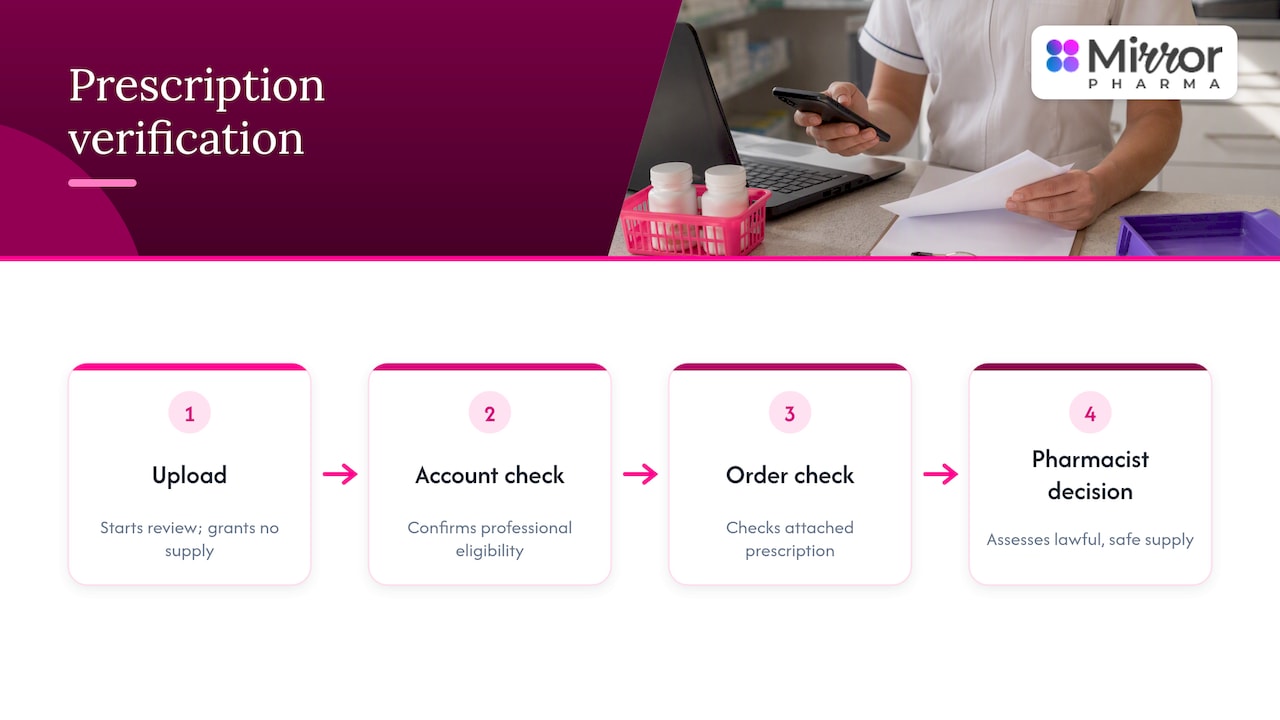
In an online pharmacy, uploading a prescription means giving the dispensing pharmacy a record of what has been prescribed, for whom and by whom. The pharmacy then decides whether it can lawfully and safely supply. The upload does not authorise anything by itself. It starts a verification sequence run by a pharmacist.
For trade customers such as clinics and practitioners, there are usually two layers. The first is account verification: the pharmacy confirms that you are a registered professional entitled to buy. The second is order-level verification: for a prescription-only medicine, the pharmacy checks the prescription attached to that order. If you are new to this, the prescriber registration page explains how access is set up with us.
This guide is educational and directed at healthcare professionals. It does not cover individual treatment decisions, which remain with the prescriber’s clinical judgement.
What the law says a prescription must contain
The starting point is Regulation 217 of the Human Medicines Regulations 2012. It states that a prescription-only medicine must be supplied against a prescription signed by the appropriate practitioner. The prescription must contain the practitioner’s address, the date, the practitioner type, and the patient’s name and address. As a general rule it cannot be dispensed more than six months after the relevant date.
That gives you a practical pre-upload checklist:
- Signature of the appropriate practitioner.
- Prescriber’s address.
- Date of the prescription.
- Practitioner type (for example doctor, dentist, nurse independent prescriber or pharmacist independent prescriber).
- Patient’s full name and address.
- Age within the six-month window.
Controlled drugs follow stricter rules. The explanatory memorandum to the Misuse of Drugs (Amendment No. 2) Regulations 2006 gives a maximum validity of 28 days for Schedule 2, 3 and 4 controlled-drug prescriptions. Most aesthetic work does not involve these, but prescribers working in wider wellness settings should know the difference.
For a closer look at the fields a pharmacist reviews in aesthetic settings, see our guide to PSD requirements in aesthetics.
Who is allowed to prescribe
A valid upload depends on a valid prescriber. The UK Government’s 2025 evidence document on private prescribing states that private prescribers must be healthcare professionals regulated by an appropriate UK regulator, such as the GMC, GPhC or the Pharmaceutical Society of Northern Ireland, depending on profession and jurisdiction.
In practice, before you upload anything, have the following ready:
- The prescriber’s full name and professional registration number with the relevant regulator.
- Confirmation that their prescribing scope covers the medicine in question.
- A way for the pharmacist to reach them quickly.
Remote prescribing in cosmetic settings has also been changing. Our checklist on remote prescribing in aesthetics sets out the steps clinicians should take to stay within current professional expectations.
The upload process, step by step
The exact screens differ between services, and each pharmacy sets its own accepted file types and size limits on its checkout or account pages. Check those before you start rather than assuming. The sequence below reflects what regulation and guidance require, whichever service you use.
Step 1: Confirm the service is a registered pharmacy
Before sending any document, check who you are sending it to. The GPhC’s 2025 guidance for online pharmacies says the website should display the pharmacy’s GPhC registration number, owner, superintendent where applicable, physical address, contact details and privacy information, along with details for checking the registration.
Our five-minute GPhC supplier check shows how to run this check quickly and what red flags to look for.
Step 2: Have your professional account verified
Suppliers of prescription medicines to the trade should verify that a buyer is entitled to purchase before supplying. Expect to provide your professional registration details and clinic information. We apply strict verification for practitioner and prescriber access, and we do not supply laypersons or patients.
Step 3: Prepare the prescription
Check the document against the six points above. Common problems are a missing practitioner type, an incomplete patient address, an unsigned copy and a date that is too old. A clear, complete, legible image or scan avoids a round of queries.
Step 4: Upload or submit it through the secure channel
Use the pharmacy’s own upload facility, not email attachments or messaging apps, unless the pharmacy specifically tells you otherwise. If the service offers no secure facility at all, treat that as a warning sign.
A point on originals: NHS England Digital states that private prescriptions are an exception where EPS is not used and a hand-signed paper prescription is required. If you are issuing a private prescription, ask the pharmacy whether it will work from an uploaded image for its initial checks or whether it needs the signed original before supply.
Step 5: Pharmacist verification
A pharmacist reviews the prescription against the legal content rules, the product and the prescriber’s details. The GPhC’s guidance requires an appropriate prescriber consultation before a prescription-only medicine is supplied, and a means of timely two-way communication so the prescriber can be asked for further information.
Step 6: Queries, corrections and resubmission
If anything is unclear, the pharmacy will contact the prescriber. Typical requests are for a corrected date, a missing registration number, a clearer image or confirmation of the clinical rationale. Answer from the prescriber’s own professional contact details so the pharmacy can confirm who is replying.
Step 7: Approval, dispatch and records
Once verified, the order moves to fulfilment. Processing time depends on how quickly queries are answered and on the order cut-off time, so build the check into your ordering rhythm rather than leaving it until stock is low. Keep your own copy of everything. Our guide to documentation with orders covers what practitioners should retain.
Upload versus the NHS Electronic Prescription Service
Many practitioners assume that every prescription works like an NHS one. It does not, and the difference matters when you are choosing how to submit.
| Feature | Uploaded private prescription | NHS Electronic Prescription Service |
|---|---|---|
| Who sends it | The prescriber or practice, to the pharmacy | Prescribing system, to the dispensing system |
| Format | Image or document, subject to the pharmacy’s rules | Digital data with a verified digital signature |
| Pharmacy choice | Chosen per order | Nominated by the patient |
| Private prescriptions | Yes | Not used; hand-signed paper required |
| Verification | Pharmacist review and prescriber contact | Signature verification in the system |
NHS England Digital explains that EPS securely transmits prescription data between prescribing and dispensing systems, records the nominated pharmacy, verifies the digital signature and can make a barcode available in the NHS App. Nomination is a patient choice of a specific community or internet pharmacy, which can be changed or cancelled through a GP or pharmacist. A nominated electronic prescription is released automatically to the nominated dispenser, while a non-nominated one can be retrieved using its prescription ID and token.
Regulation 219 of the Human Medicines Regulations adds that in specified cases a prescription must be created electronically, signed with an advanced electronic signature and sent electronically to the dispenser. If your prescription falls under those cases, a simple image upload will not meet the requirement.
What online pharmacies must verify
Online supply carries extra risk, which is why the GPhC tightened its expectations. In February 2025 it announced that online pharmacies must strengthen safeguards, and that high-risk prescribing cannot rely on an online questionnaire alone. Information must be independently verified through two-way communication, clinical records or contact with a regular prescriber.
For weight-management medicines, the same announcement says independent verification of weight, height and/or BMI is needed before prescribing, and online services must provide two-way communication between prescriber and patient. Prescribers working in weight management should read our overview of weight management medications and expect the pharmacy to ask for supporting information.
What this means for you as a prescriber:
- A pharmacy that asks follow-up questions is doing its job, not creating delay.
- Keep clinical records accessible so you can confirm details the same day.
- Be wary of any supplier that never asks for anything beyond a payment.
Keeping prescription and identity data secure
An upload contains patient names, addresses and sometimes clinical detail, so security is part of the process, not an extra. The GPhC guidance says platforms must securely collect, use and store users’ details, comply with data-protection law, provide a privacy notice and use secure facilities for payment processing.
Practical habits for your clinic:
- Upload only what is needed for the order. Do not attach unrelated patient records.
- Use the pharmacy’s own portal, over a secure connection, from a device you control.
- Avoid public Wi-Fi when handling patient documents.
- Delete local copies from phones and shared folders once they are filed in your clinical record system.
- Read the privacy notice, and confirm the pharmacy states how long it keeps documents.
Common reasons an upload is held up
- Incomplete prescriber details. No registration number, or an address that does not match the regulator’s register.
- Missing practitioner type. The Regulation 217 content list includes it.
- Unsigned or illegible documents. A poor photograph is the usual culprit.
- Out-of-date prescriptions. Check the six-month general limit, and 28 days for relevant controlled drugs.
- Product mismatch. The product ordered differs from what was prescribed.
- Unlicensed products without the right paperwork. See our guide to the MHRA checks for unlicensed medicines.
Perspective: what we see from the supplier side
We supply prescription aesthetic medicines, vitamins, infusion therapies and consumables only to trained practitioners and prescribers, so verification is built into how we work. Our view is that the upload step should feel routine to a prepared clinic and uncomfortable only to someone who should not be buying.
Three habits separate smooth orders from slow ones. First, prescribers who keep their registration details and clinic information in order never wait for a query to be resolved. Second, practitioners who treat the pharmacist’s questions as part of patient safety, not as an obstacle, tend to resolve them in one exchange. Third, clinics that order ahead of need, and use our extended order cut-off times for the days when they cannot, avoid rushing documents.
We would rather ask one question too many than supply something we cannot stand behind. Our team of healthcare professionals handles fulfilment, and the online ordering experience is designed so that compliance and convenience do not fight each other.
— Rizwan
Ordering with us as a licensed practitioner
If you are a registered prescriber or a practitioner working with one, you can set up verified access through our prescriber registration and then order from our ranges, including toxins, dermal fillers, IM/IV vitamins and weight loss products. Access is for qualified aesthetic professionals only, and verification applies to every account.
A pre-upload checklist for clinics
- Pharmacy’s GPhC registration confirmed on the register.
- Prescriber’s registration number and scope checked.
- Prescription signed, dated and within its validity period.
- Patient name and address complete.
- Practitioner type stated.
- Image clear and complete, in a format the pharmacy accepts.
- Prescriber available to answer questions that day.
- Copies filed in your own records.
If you are comparing suppliers more broadly, our guides on choosing a safe online pharmacy and the documents to get from a medicine supplier give the wider checks.
FAQ
Can I upload a photo of a prescription instead of the original?
That depends on the pharmacy and the type of prescription. A clear image is commonly used to start the pharmacist’s checks, but private prescriptions require a hand-signed paper form in NHS England systems, so ask the pharmacy whether it needs the original before supply.
How long is a prescription valid for?
Under Regulation 217, a prescription-only medicine generally cannot be dispensed more than six months after the relevant date. Schedule 2, 3 and 4 controlled-drug prescriptions have a maximum validity of 28 days.
Why does the pharmacy contact the prescriber after I upload?
The GPhC expects online pharmacies to offer two-way communication with the prescriber and to verify information independently. A query about a date, registration number or clinical detail is part of that check and is usually quickly resolved.
Does the NHS Electronic Prescription Service work for private prescriptions?
No. NHS England Digital lists private prescriptions as an exception where EPS is not used. EPS also relies on patient nomination of a pharmacy, which does not apply to a private order placed by a practitioner.
Sources
- The Human Medicines Regulations 2012, Regulation 217
- The Human Medicines Regulations 2012, Regulation 219
- Explanatory Memorandum to the Misuse of Drugs (Amendment No. 2) Regulations 2006
- GPhC: online pharmacies to strengthen safeguards
- GPhC: guidance for registered pharmacies providing pharmacy services at a distance
- GOV.UK: private (non-NHS) prescribing call for evidence
- NHS England Digital: Electronic Prescription Service transparency notice
- NHS England Digital: EPS nomination standards
- NHS England Digital: EPS prescriber developer guide
- NHS England Digital: EPS in GP practices